For multi-office dental groups

What did each office's ad dollars buy?

See the leads, bookings and patients seen that each office's Google and Meta spend bought, checked against your PMS software. Your PMS stays, and our team can run the ads for you.

Book a 20-minute demo

On the call we review each office's Google and Meta accounts with you.

  • 20 minutes, at a time you pick
  • With Andrew, who built it
  • Your offices, questions answered live
  1. SpendGoogle and Meta, per office
  2. LeadIn the right office's list
  3. BookingChecked against your PMS software
  4. Patient seenAnd what's left in the chair

Every screenshot on this page is Ultra Dental's workspace in Plya Dental OS.

Works with

  • Open Dental
  • Google Ads
  • Meta Ads
  • Local Services Ads
  • QuickBooks

Runs alongside your PMS (Open Dental today).

Every office runs on its own. Nobody sees them side by side.

  • AdsEach office has its own ad accounts, and its own idea of what they bought.
  • Front deskEach office has its own phones, its own callbacks and its own missed calls.
  • NumbersEach office has its own numbers in the PMS, in its own reports.

Plya Dental OS puts every office's ads, patient texts, front desk and numbers in one place, checked against your PMS software.

Marketing, office by office

Every ad dollar, followed to the chair, for each office.

What your ad dollars turned into

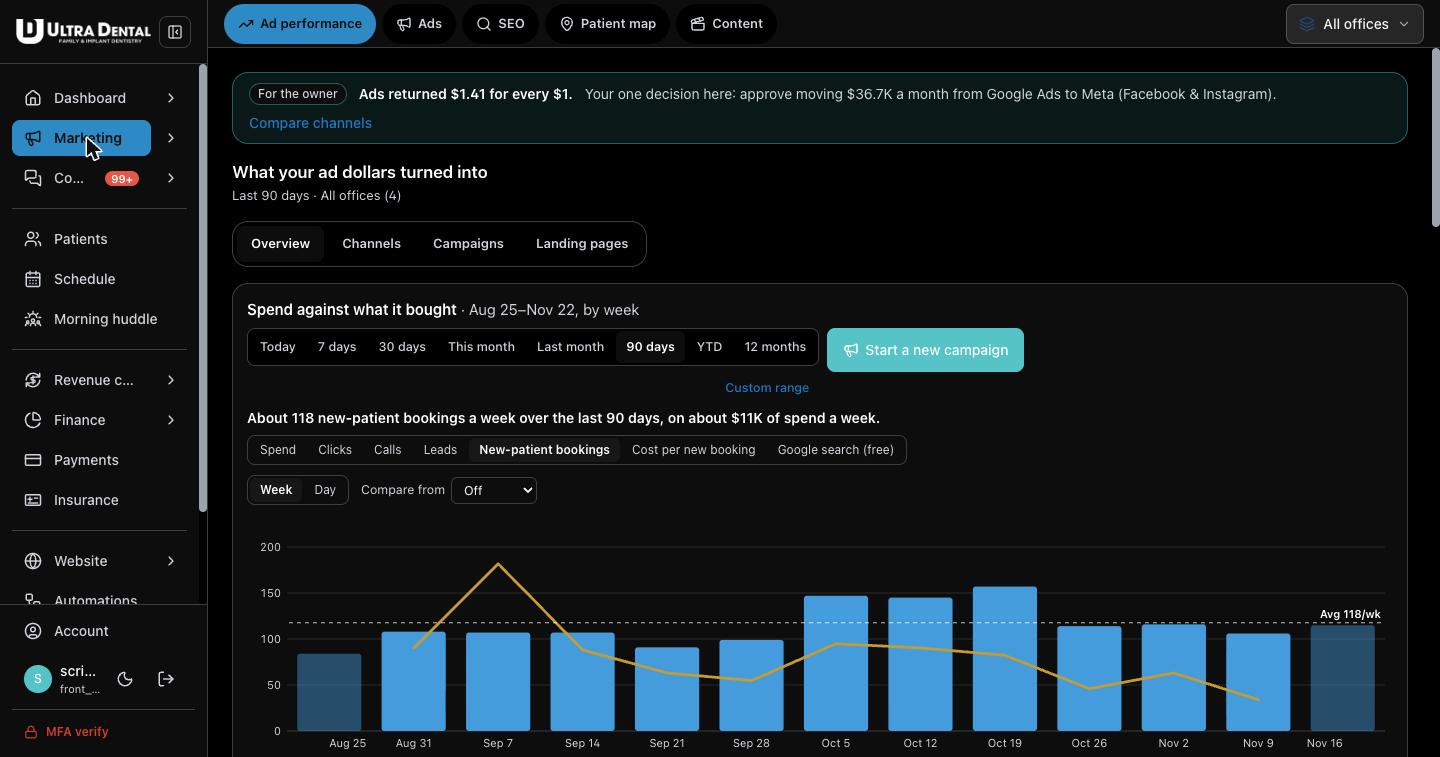
Ad performance shows what each office's ad dollars turned into: leads, bookings, patients seen and the production still left in the chair. Bookings and patients are checked against your PMS software.

  • Overview, Channels and Campaigns views. On All offices, the offices are added up.
  • The funnel from ad dollar to production names the biggest leak, and the left-in-chair lists link straight to call lists.
Ad performance for All offices: a weekly chart of new-patient bookings against spend, with tabs for spend, clicks, calls, leads, bookings and cost per new booking.
Ultra Dental's workspace in Plya Dental OS

Every office, its own ads

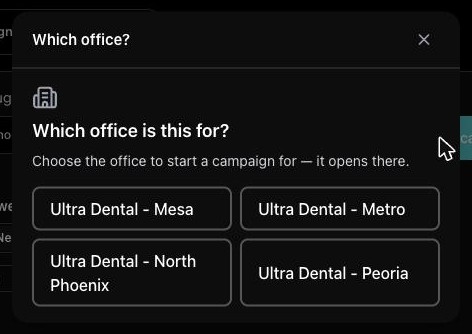
Every way into Ads asks "Which office?" first, and every campaign belongs to exactly one office.

Dialog titled Which office is this for?, asking which office to start a campaign for, with one button per office.
Ultra Dental's workspace in Plya Dental OS
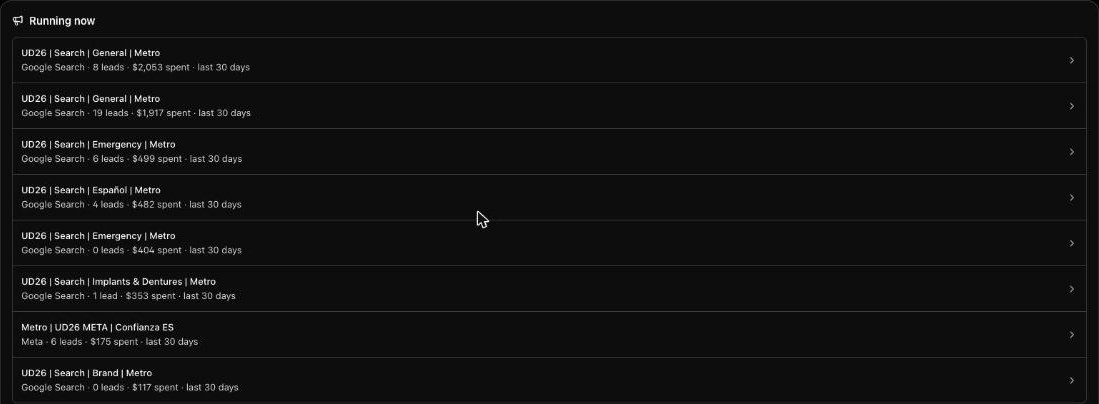
  • On All offices, one card per office: 30-day spend, leads, cost per lead and live campaigns, plus a "Running now" list.
  • Meta leads that matched no office are listed without names, so they can be routed.

About a year of spend, on the first sync

Then each office's Google and Meta spend syncs every 3 hours, including campaigns built outside Plya.

Local Services leads every 10 minutes

Google Local Services leads are pulled into the right office's lead list. Read-only: Plya never edits Local Services.

Money, only for the right people

Money shows only to people given "Can see money". Unbooked-lead lists show only to call-list roles.

A text with a booking link, right away

Every Meta instant-form lead gets one text right away, with a booking link, from the office's own number and inside quiet hours. The office can switch it off. It sends once that office's messaging is Live and its texting number is registered.

  • Lead flows by source: set who gets each new lead, which steps run and which tags apply, with a dental new-patient preset and a leads-by-source report.
Running now list for one office: each campaign with its channel, leads and spend for the last 30 days.
Ultra Dental's workspace in Plya Dental OS

Run by us. By default, approved by you

How the marketing works for your practice

  1. We build your plan and campaigns.

  2. We run your ads, listings and landing pages.

  3. Every campaign or keyword is followed to the call, the booking and the patient who showed.

  4. A morning report tells you what to change, and you approve every change.

Who decides, per office

  • Approval (the default)Each change is texted to the owner. It runs after a YES by text or in the app.
  • OffRead-only. Plya's team can look, not change.
  • FullChanges run at once, with a text notice.

Booked and showed are checked against your PMS software. Nothing about who booked or showed is sent to Google or Meta.

Book a 20-minute demo

Ad spend is separate from our fee.

Build an ad in your own words.

Pick the office, describe the offer the way you'd say it at the front desk, and Plya Dental OS drafts the Google and Meta ads, the keywords and the booking page. Turned on at setup for every group.

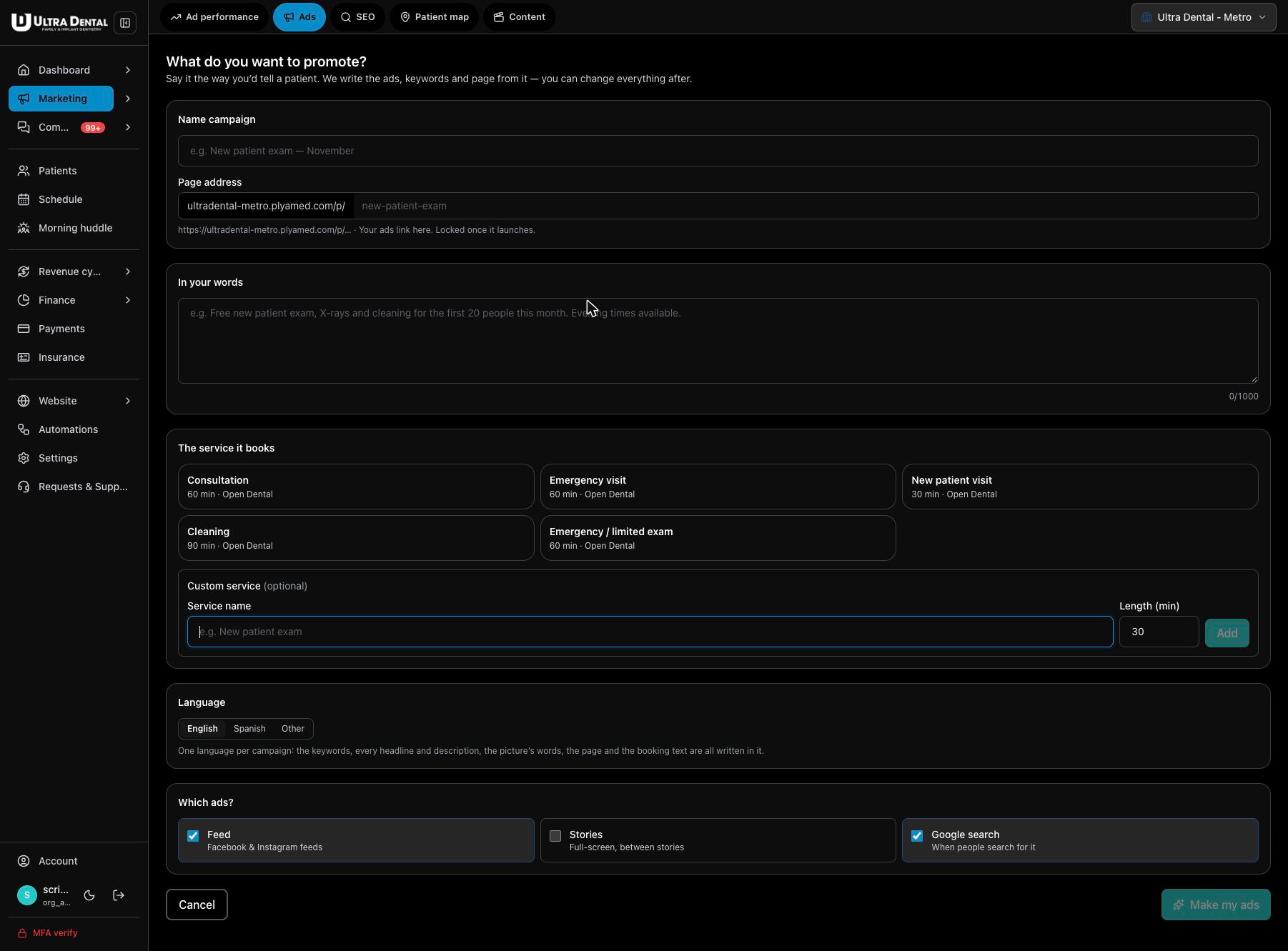
"Say it the way you'd tell a patient. We write the ads, keywords and page from it — you can change everything after."The wording on the screen

  1. Pick the officeEvery campaign opens inside one office.
  2. Say it in your wordsChoose the service it books, the language (English or Spanish) and which ads: Facebook and Instagram feeds, Stories, or Google search.
  3. Change anythingEdit the drafted ads, keywords and booking page before anything goes out.
  4. Nothing runs until you say yesYou review it, then you approve it.
Campaign step titled What do you want to promote?, with fields for campaign name, page address, the offer in your words, the service it books, language and which ads, and a Make my ads button.
Ultra Dental's workspace in Plya Dental OS

Beyond the ads

Bring patients back, turn every missed call into a task, and rank every office.

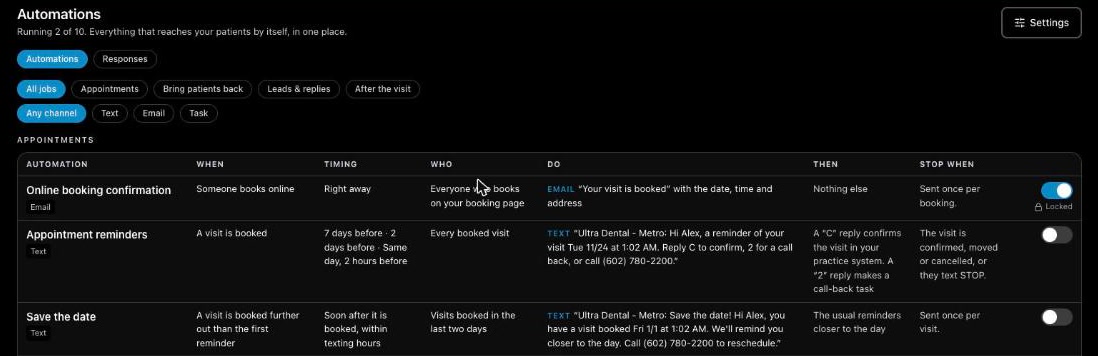
Automations table, Appointments group: online booking confirmation, appointment reminders and save the date, each with timing, who it reaches and an on/off switch.
Ultra Dental's workspace in Plya Dental OS

Texts that bring patients back

Every automation sits in one table. Turning one on shows a preview and asks you to confirm. Turning one off is instant, with Undo.

  • Text first, then a task. Recall due, a missed visit, unscheduled treatment and lapsed patients start with a booking-link text. A staff task appears only if nobody books.
  • Google review requests two hours after a visit. Everyone is asked; no review gating.
  • Messaging starts Paused for every office. Nothing is texted until an owner or admin turns that office Live.
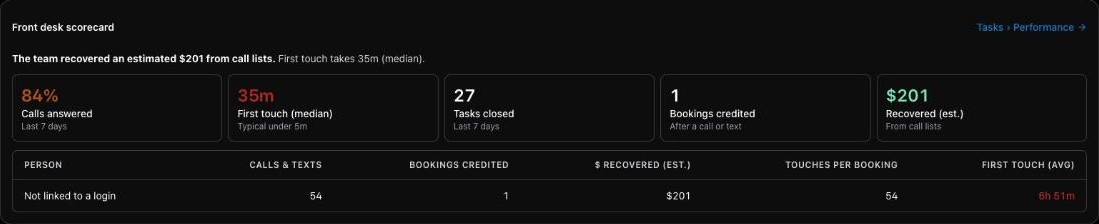
Front desk scorecard for one office: calls answered, first touch, tasks closed, bookings credited and recovered from call lists, with a per-person table.
Ultra Dental's workspace in Plya Dental OS

Every missed call becomes a call task

One feed of texts, email, calls and voicemail, with Call, Text and Email on every row. Per office, or on All offices.

  • Call lists for unconfirmed visits, no-shows, overdue recall and unscheduled treatment.
  • Call history with search and recordings.
  • Check-in kiosk, fax, and forms and payments written to your PMS. Turned on at setup
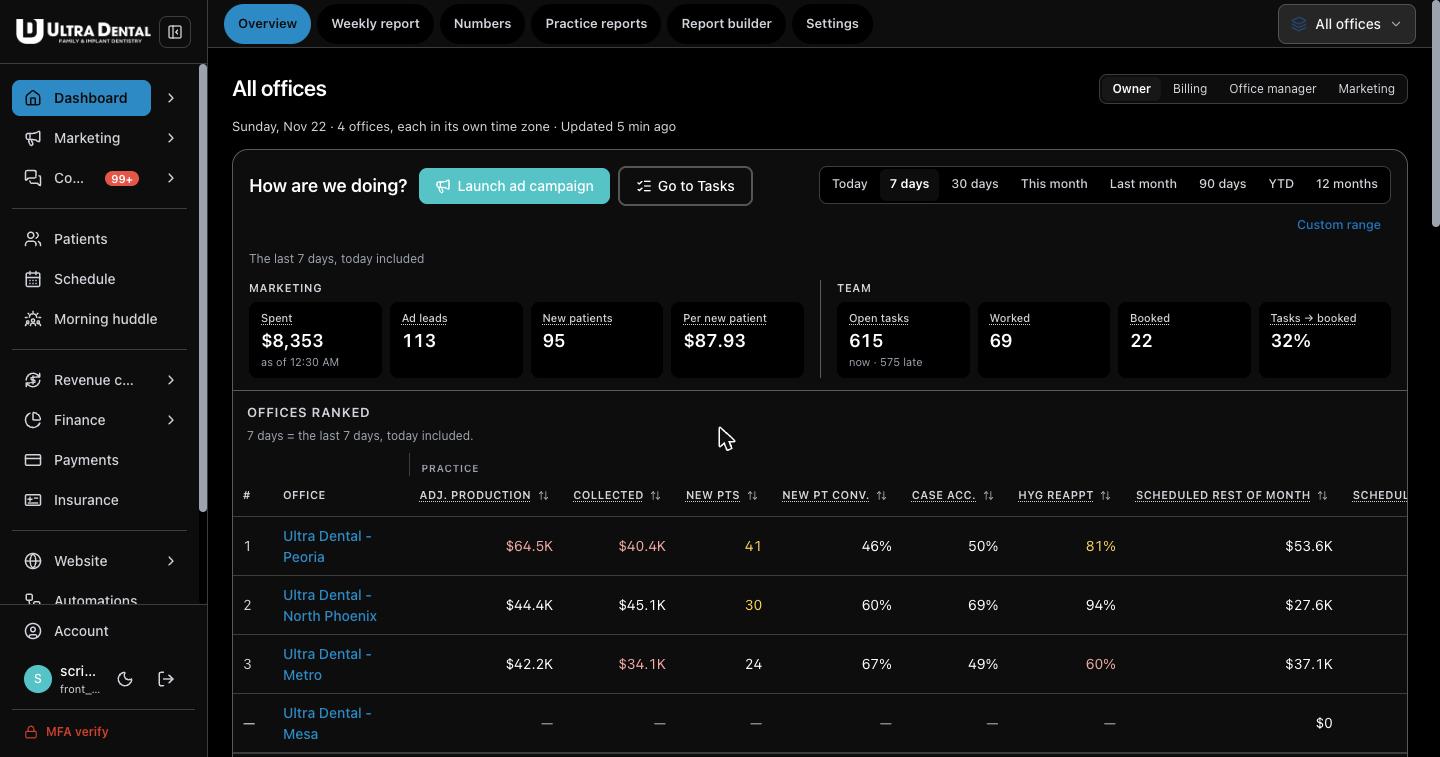
All offices dashboard in the Owner view: marketing and team tiles, a Launch ad campaign button, and the offices ranked side by side by production, collections, new patients and more.
Ultra Dental's workspace in Plya Dental OS

All your offices, ranked side by side. The worst miss named.

A dashboard per office or with All offices added up. It names the worst miss in one sentence, and every number opens to the rows behind it.

  • What Plya booked: each PMS booking credited to an ad, the website, a text, staff work or organic, with a dollar value.
  • Decisions for you, the morning huddle, and bulk eligibility checks for tomorrow's patients. Turned on at setup

Keep your practice software. Add what's around it.

The owner connects Open Dental with a customer key and maps each Open Dental clinic to an office. Appointments, patients, providers, schedules and operatories, payments, claims, procedures and pay splits sync in.

  • Numbers are checked against your PMS software.
  • PMS health per data source, with banners when it's down. Automations pause while it's down.

Built, and still rolling out

  • Rolling outRevenue-cycle worklistIt does not submit claims or post payments.
  • Rolling outPhone menu and call pop-upsOn Plya phone lines only.
  • Rolling outWeekly blog articlesPlya-hosted websites only.

Does this replace Open Dental?

No. Plya Dental OS runs alongside your PMS (Open Dental today).

On a different PMS?

Other PMS: ask on the call.

Preview first. By default, a yes.

  • One Live / Paused texting switch per office, audited
  • Messaging access per role or person
  • Two-factor sign-in and SSO
  • 15-minute idle logout
  • Patient map hides any group under 11
  • Call notes need a BAA and are stored encrypted

Built for and used by Ultra Dental.

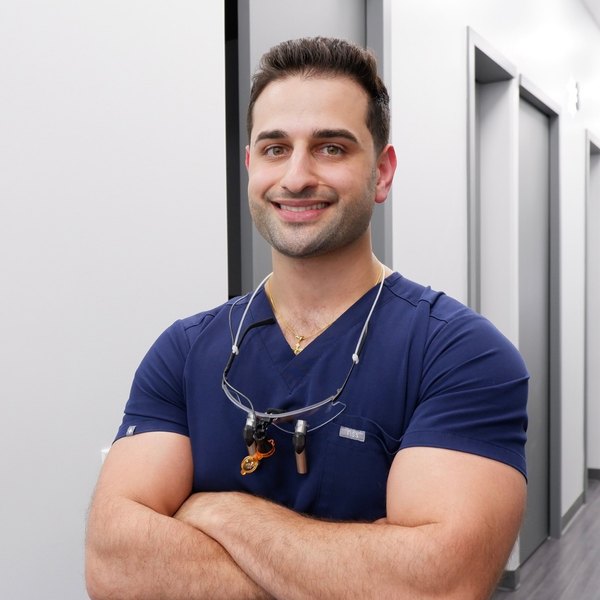
Portrait of a dentist at Ultra Dental.Pictured: a dentist at Ultra Dental

Built for and used by Ultra Dental, a four-office dental group.

Every screenshot on this page is Ultra Dental's workspace.

I built Plya Dental OS with Ultra Dental's team, on their real offices. On the call I'll show you the screens on this page and go through your own offices' Google and Meta accounts with you.

Andrew Sinichar, founder of Plya Med

What you get on the call

Twenty minutes, your offices, the person who built it.

  1. YOUR ADS

    Each office's Google and Meta accounts, reviewedWe go through them with you, office by office.

  2. THE SCREENS

    See the four partsMarketing, texting, the front desk and the owner's view.

  3. STRAIGHT ANSWERS

    20 minutes with Andrew, who built itYour questions answered live, including the price.

Book a 20-minute demo

Pick a time. The calendar takes your details. No form first.

Book a 20-minute demo
Pick a timeBooking page previewPreview of the booking page for the 20-minute Plya Dental OS demo with Andrew Sinichar, showing open times by day.A capture of the booking page.Open calendar →

Before you book

Does this replace Open Dental?

No. Your PMS stays. Plya Dental OS runs alongside it (Open Dental today), maps each Open Dental clinic to an office, and checks bookings and visits against your PMS software.

What does it cost?

The price is given on the demo call. Ad spend is always separate.

Can Plya run our ads?

Yes. Plya's team can run each office's Google and Meta ads. By default every change is texted to the owner first, and nothing runs until the owner replies YES or approves it in the app. You can switch an office to read-only, or to Full, where changes run at once with a text notice.

We're on a different PMS. Will it work?

Other PMS: ask on the call.

Who is on the call?

Andrew Sinichar, who built Plya Dental OS. The call takes 20 minutes, and we review each office's Google and Meta accounts with you.

Can we pause all patient texting?

Yes. Each office has one Live / Paused switch that holds every automated and marketing text. Pausing takes one click, going Live asks you to confirm, and every flip is audited.

What goes to Google or Meta?

Nothing about who booked or showed. The patient map shows exactly what an audience would send, and any group under 11 people is hidden. The Local Services pull is read-only: Plya never edits Local Services and never reads lead conversations.

What is turned on when we start?

These are turned on at setup for a new group: the ad wizard, texting from your existing office numbers, number porting, fax, check-in kiosk, forms, payments and confirmations written to your PMS, the morning huddle, Decisions for you, and bulk eligibility checks. Patient texting still waits until an owner or admin turns each office Live.

What is still rolling out?

The revenue-cycle worklist (it does not submit claims or post payments), the phone menu, ring groups and call pop-ups (on Plya phone lines only), and weekly blog articles (for Plya-hosted websites only).

See what each office's ad dollars bought.

Twenty minutes with Andrew. We review each office's Google and Meta accounts with you. Your PMS stays, and by default no ad change runs until you say yes.

Book a 20-minute demo